Getting Started
Last updated: 2026-01-29
This section provides you will all you need to get started using the API. Should you have any issues however, please to not hesitate to contact us with the following means:
- WhatsApp Chat
- Contact Form on our website
1 - API Account
To use our API, you must first have a MantaRisk API account. Accounts are set up by our team: get in touch here and we will arrange access for you.
You can review our plans here beforehand if you want to see what each one includes.
2 - API Key
The next step is to generate a key which you will use to programmatically authenticate when using the API.
Once logged into MantaRisk, go to Access -> Your Account (see screenshot below). Here press the Generate button. The key will be generated and associated to your account.
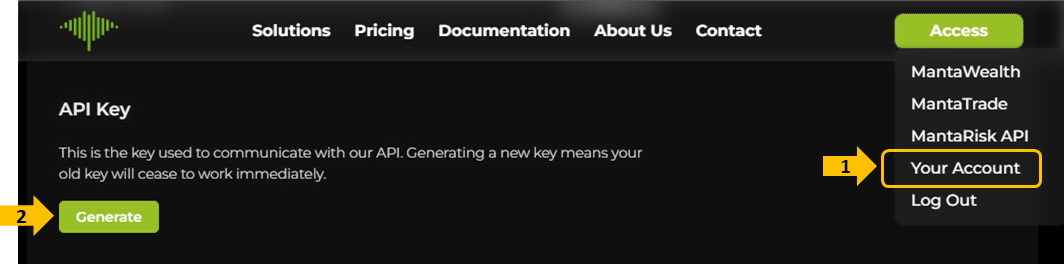
Please make note of the key! For security reasons, it will disappear as soon as you exit the page and cannot be retrieved. If you happen to have lost your API key, then a new one needs to be generated by pressing the Generate button.
An account can only ever have one API key. Generating a new key will discard your old one and any system using the old key will no longer be able to access our API.
3 - Test Environment
Our API documentation is hosted on this website and is available here:
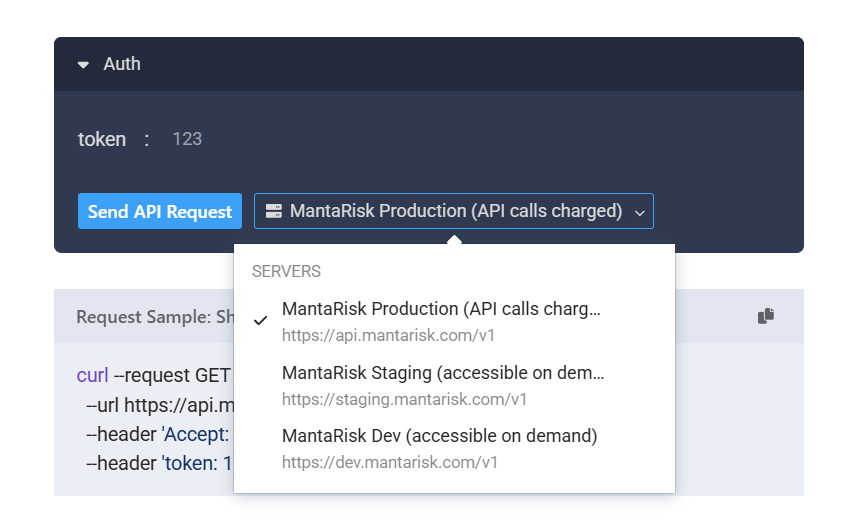
Here you can choose to test against one of three environments:
- MantaRisk Production. This is the real risk engine which performs on-demand analytics. To use this you need the API key generated in the previous step. Calls to this service are charged as per usual.
- MantaRisk Staging. This is our stable test environment. It matches the production environment in terms of functionality and is used to run specific tests our clients require. Access to this environment is provided on demand.
- MantaRisk Development. This is where the latest features of our engine are available prior to going live. Our clients can access this environment to start their development ahead of time. Access to this environment is provided on demand.