Diversification
Last updated: 2026-09-28
The Diversification tab lets advisers show clients exactly how a proposed portfolio change improves or worsens diversification. Instead of presenting abstract allocation percentages, it shows which holdings drive the portfolio's risk, how much of that risk diversification already removes, and what the change does to both — providing the transparency needed to build trust and support the rationale for rebalancing decisions.
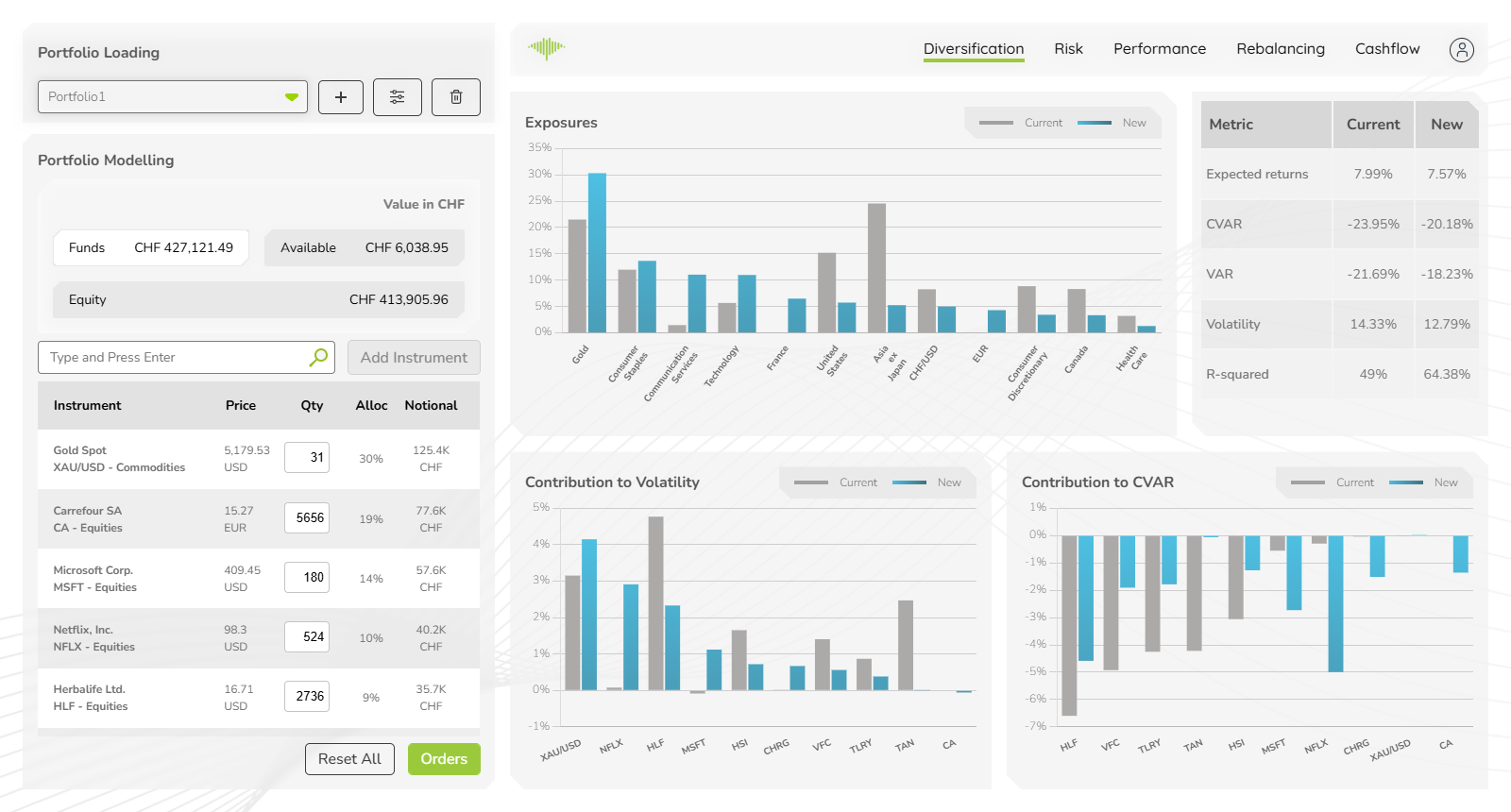
Every panel compares two portfolios: Current, the portfolio as loaded, and New, the modelled portfolio after any changes made in the Portfolio Modelling panel on the left. All figures update automatically whenever a position is modified. Hover the ⓘ icon beside a figure or column heading for its definition.
Headline Figures
Three tiles across the top summarise the new portfolio. Each shows the new figure, the current one after "was", and the change in percentage points, coloured green when the change is an improvement and orange when it is not.
| Figure | Description |
|---|---|
| Expected returns | Yearly expected return from the risk-factor model |
| Volatility | Yearly volatility of the portfolio |
| CVaR | Conditional Value at Risk (95%), also called Expected Shortfall: the average loss in the worst 5% of cases |
| VaR | Value at Risk (95%): the loss the portfolio stays within in 95% of cases. Shown in the corner of the CVaR tile |
VaR marks where the bad cases start; CVaR says how bad they are on average, so it is always at least as large a loss as VaR. Both are based on the portfolio's actual return history.
Exposures
The Exposures panel shows the portfolio's exposure to each risk factor, one row per factor:
- Ring — where the current portfolio sits
- Dot — where the new portfolio lands
The line between them shows how far the change moves that exposure. To the right of each row are the new exposure and its change in percentage points. The Type column says what kind of factor each row is — for example Geography, Sector, Currency, Commodity, Corporate or Money Market.
- Filter the rows to one factor type with the dropdown at the top of the panel.
- Sort by clicking the Factor or Type heading. The panel opens with the largest exposure in the new portfolio first.
- Hover a ring or dot to see the holdings behind that exposure.
Factors with an exposure below 1% in both portfolios are not listed. This makes concentration immediately visible — a factor far to the right is a potential over-exposure, and the dot shows whether the change reduces it.
Largest Risk Shifts
This panel lists only the holdings whose risk the change moves, largest move first (up to eight). Each bar is the change in the holding's contribution to portfolio risk, in percentage points:
- Bars to the left mean the holding now adds less risk
- Bars to the right mean it now adds more risk
Switch between CVaR and Volatility with the toggle; the panel opens on CVaR. Holdings whose risk does not move are left out, and the panel is hidden when no holding's risk moves at all — for example before any change has been modelled.
Risk by Holding
The table shows which holdings drive the portfolio's tail loss (CVaR) and volatility, and how the change affects that. Holdings are ranked by the size of their contribution to CVaR in the new portfolio. The ten largest are listed individually; the rest are combined into an Other row, and the Portfolio row at the bottom gives the totals, so the table always adds up.
| Column | Description |
|---|---|
| Holding | Ticker and name |
| Weight | The holding's weight, current → new. Only one figure is shown when the change leaves it where it is |
| Contribution to CVaR | How much the holding adds to the portfolio's CVaR; the contributions add up to it |
| Contribution to volatility | The holding's contribution to the portfolio's yearly volatility; the contributions add up to it |
| Risk kept | How much of the holding's own tail risk is left once it sits in this portfolio |
Each contribution shows a bar, the new value and its change in percentage points. The bars are coloured by what the change does:
- Unchanged — the part of the contribution both portfolios share
- Added — what the new portfolio adds
- Removed — what the new portfolio takes away
- Hedge — what the new portfolio adds on the risk-reducing side
CVaR is a loss, so contributions to it are negative. A positive contribution means the holding tends to gain in the portfolio's worst 5% of cases, so it acts as a hedge. A holding can add to volatility yet cushion those worst cases, so its two contributions can point in different directions.
For how contributions are calculated, see Contribution to Risk.
Risk Kept
Risk kept is the holding's contribution to the portfolio's CVaR divided by the CVaR it would have on its own:
- 100% — the rest of the portfolio offsets none of its risk
- 40% — the rest of the portfolio offsets 60% of it
- Below 0% — the holding is a hedge: it tends to gain in the portfolio's worst cases, and is tagged hedge
On the Portfolio row, risk kept is the portfolio's CVaR divided by the sum of its holdings' own CVaRs — how much of their combined risk is left after diversification. The note beneath it states how much diversification removes.
Quality of Analysis
A line below the table shows how far the analysis itself can be relied on, for both portfolios:
| Figure | Description |
|---|---|
| Risk coverage | Share of the portfolio's gross weight whose risk is modelled. The remainder is holdings MantaRisk could not model, usually for lack of usable price history — the figures above cover only the modelled share |
| Factor risk share | Share of the portfolio's risk (variance) explained by common risk factors; the remainder is instrument-specific risk |
If only one of the two portfolios can be analysed, the tab shows that portfolio on its own and says which one it is showing.
Comparing the current and new figures gives an immediate read on whether a proposed change improves the risk-adjusted profile before any order is placed.

